Skip to content
LTX Mac Farm
FARM://LOCAL_NETWORK 04 NODES

Who needs CUDA?

Make every Mac
render.

Turn the Apple Silicon already on your desks into one coordinated LTX-2.3 video pipeline. No NVIDIA. No cloud. No per-render cost.

macOS 11+ · Apple Silicon · open source · runs entirely on your own hardware

LTX_MAC_FARM / OVERVIEW LIVE
The LTX Mac Farm job board: queued, rendering, done and failed lanes across four Macs

THE SAME BOARD / NATIVE + BROWSER / LIVE FROM THE SHARE

throughput on 4 Macs

Near-linear. Each Mac renders a different clip.

$0
per render

No cloud GPU bill. The hardware is already on the desks.

0.68s
to stage 87GB

Models hardlink onto the share instead of copying.

$20
switch

Gigabit is plenty — only job files and MP4s cross the wire.

The app

Menubar on every Mac. Browser for the team.

One app, two front doors. It lives in the menubar with a ping sound as each job moves, and it serves the same interface over HTTP — so the producer watches the board from their own desk, or a phone, without mounting anything.

Drag or scroll through the app

01 / 06
VIEW_01

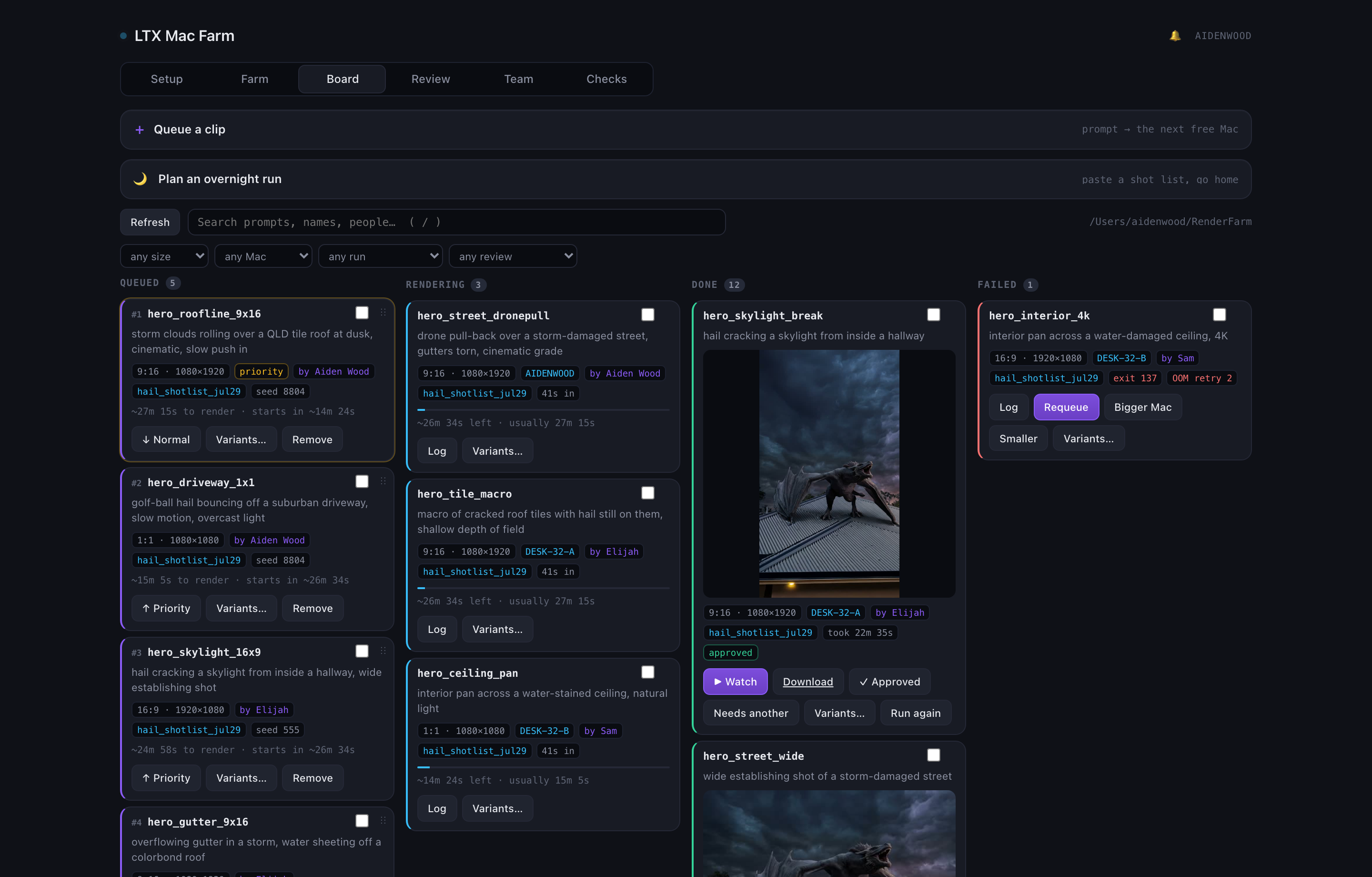
The board

Queued → rendering → done → failed, read straight off the shared folder. Drag to reorder what renders next — claim order is filename order, so a drag genuinely re-prioritises the farm. Every card says who asked for it and roughly how long it takes on your Macs.
The board
VIEW_02

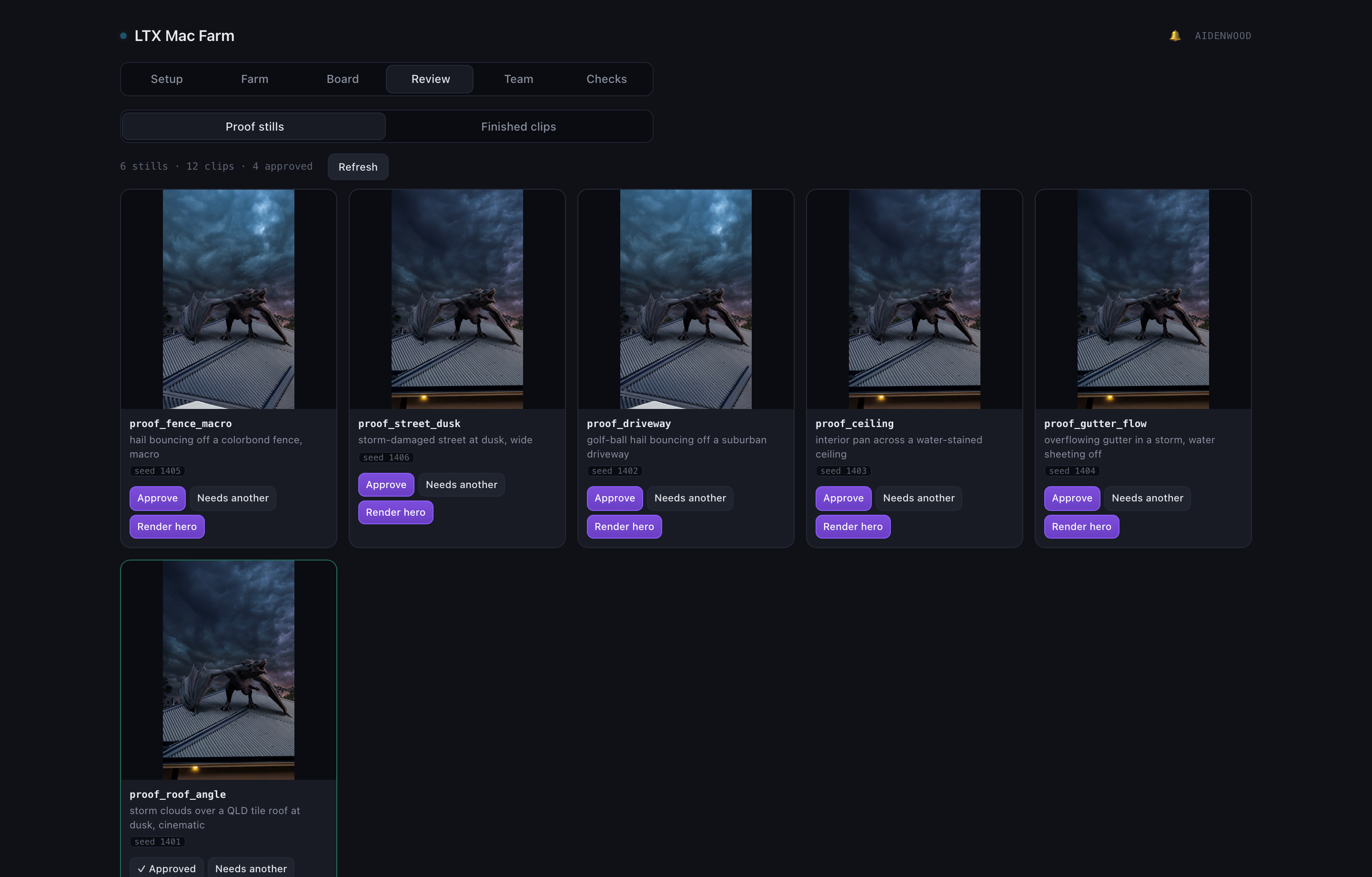
Cherry-pick before you spend an hour

Proof stills render in seconds. Lay them out, pick the framing that works, and Render hero spends real farm time on that exact seed. Approve or send back — the decision lives on the share, so the whole team sees it.

Cherry-pick before you spend an hour
VIEW_03

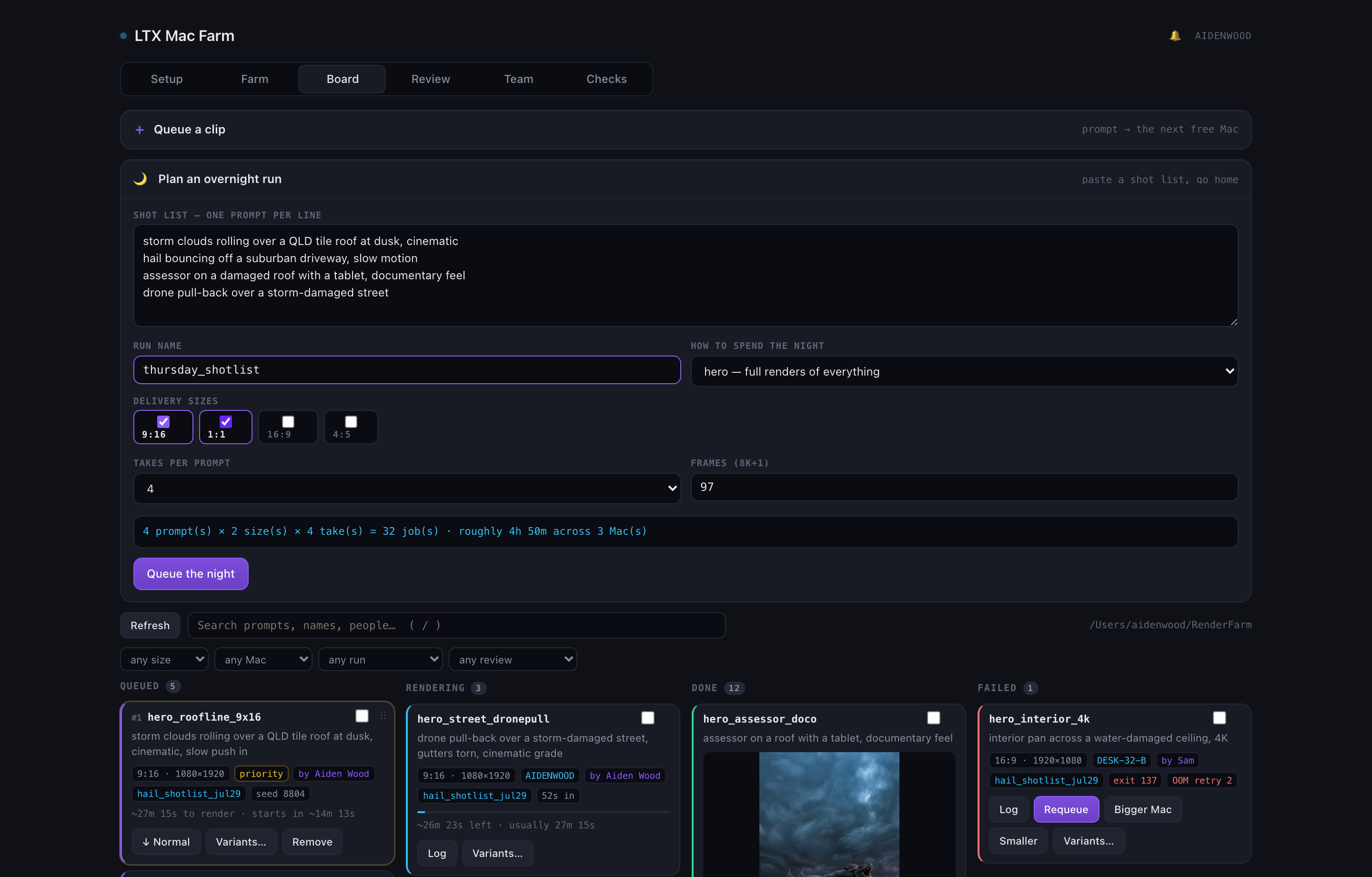
Paste a shot list, go home

Prompts × delivery sizes × takes, queued as one named run. It prices the night before you commit it — jobs, and roughly how long that is across however many Macs are actually up.

Paste a shot list, go home
VIEW_04

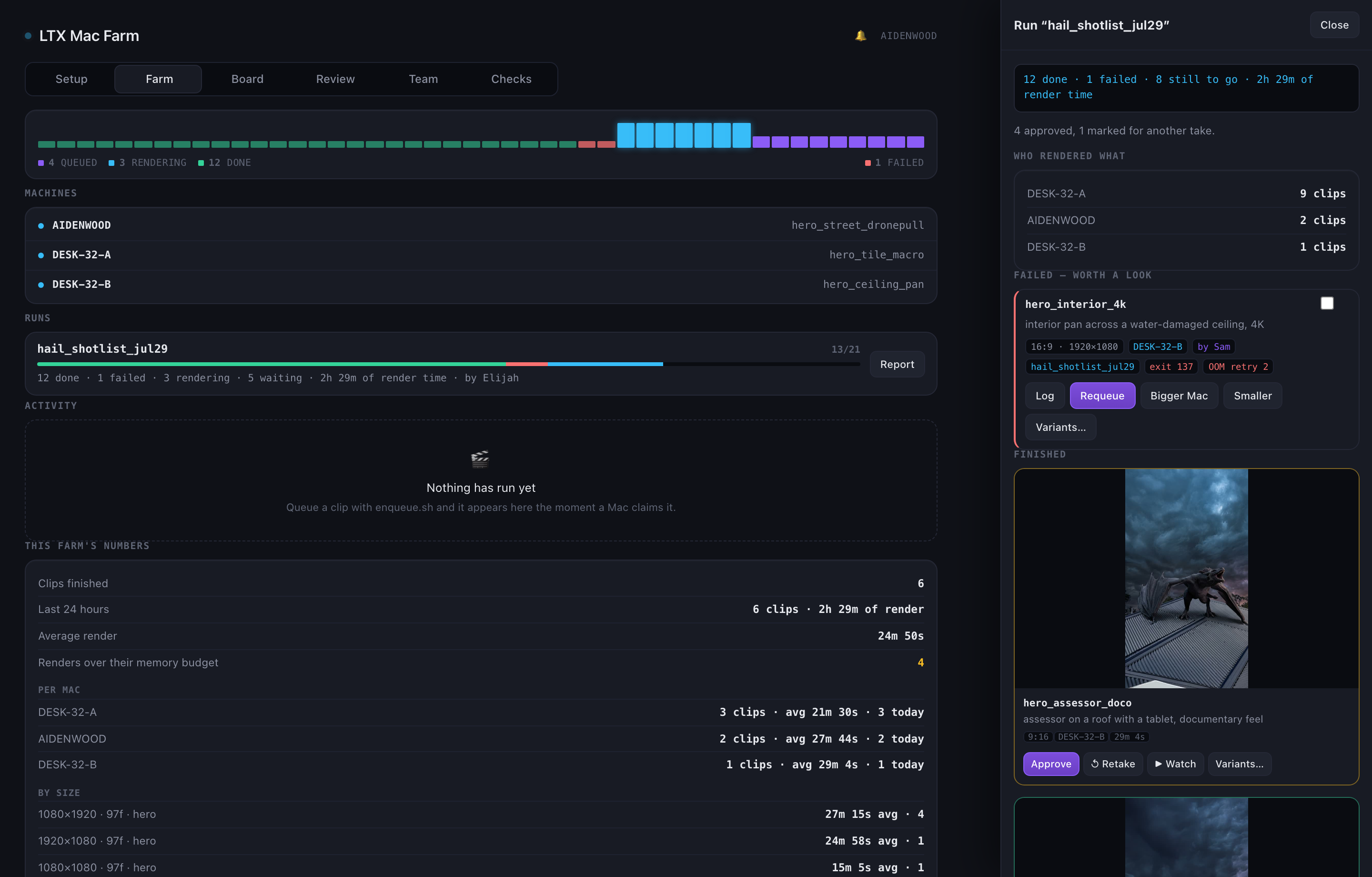
The morning report

What landed, what failed (as cards you can act on), who rendered what, and what got approved. Autopilot’s overnight decisions sit in the log next to it.

The morning report
VIEW_05

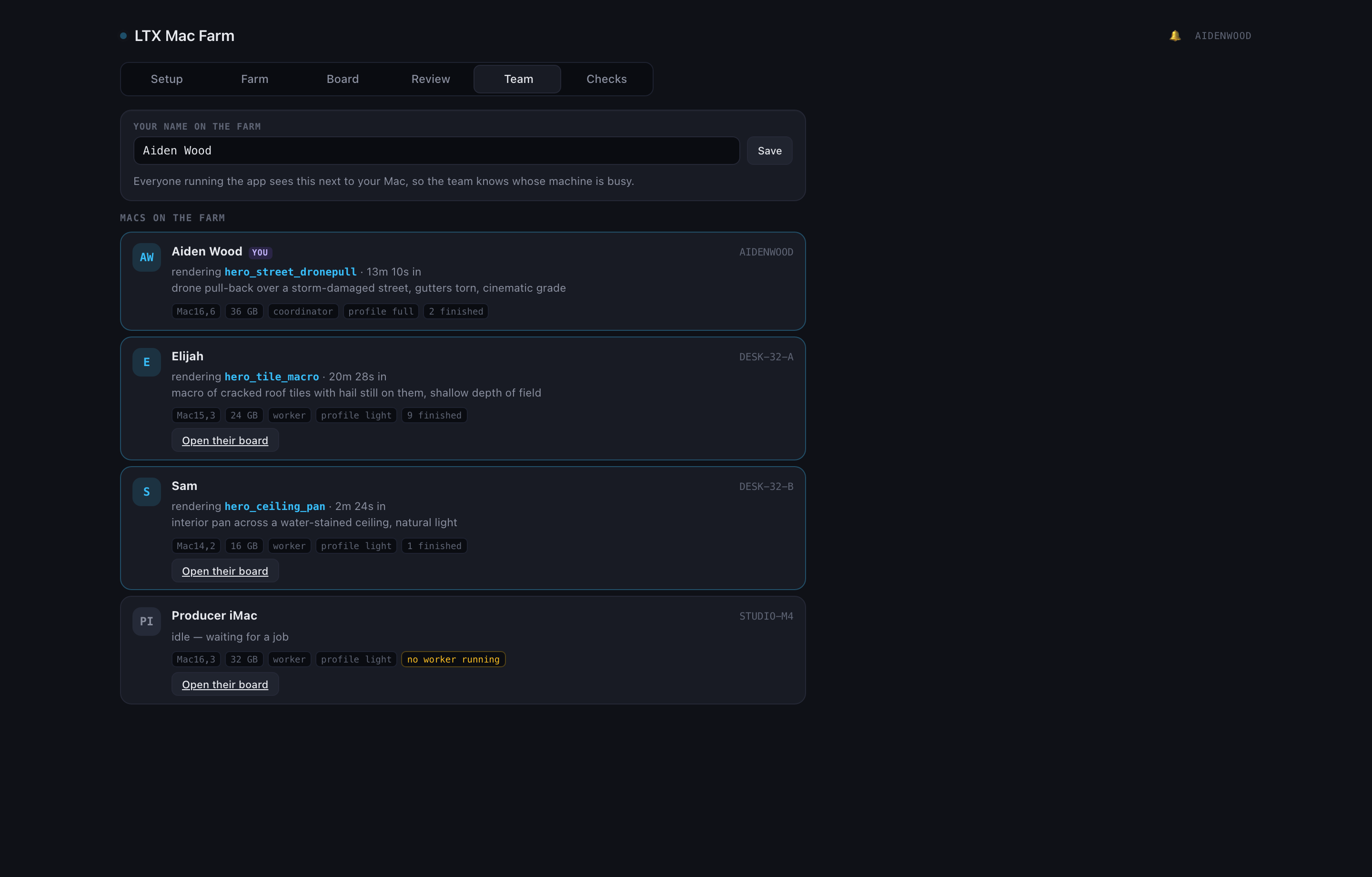
Who’s on the farm

Every Mac running the app publishes itself to the share: the person at it, the model, the RAM, the profile, and what it’s rendering this second. A Mac with the app but no worker gets flagged, so “online” never quietly means “idle”.

Who's on the farm
VIEW_06

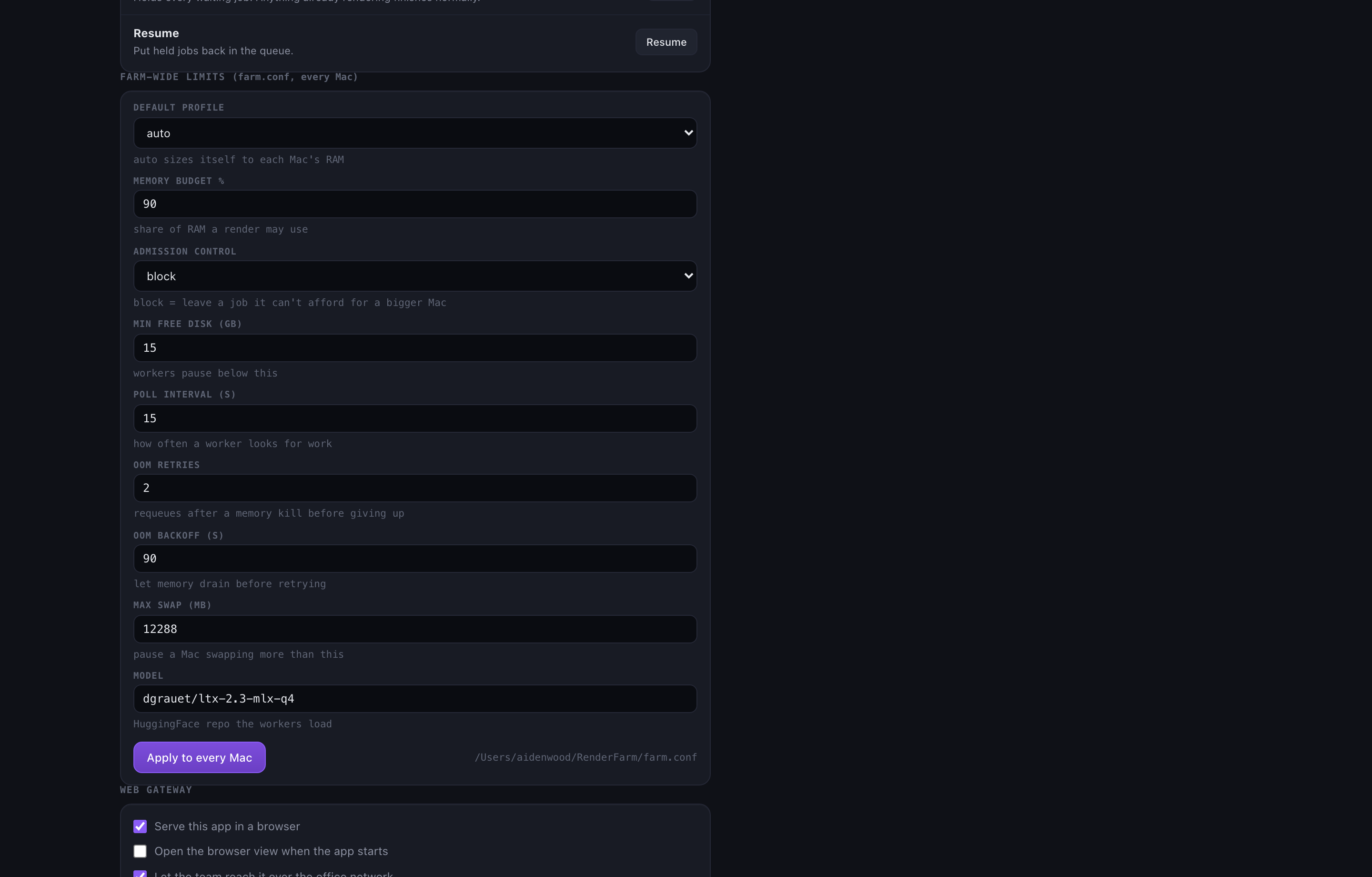
Run it without a terminal

Reap stalled jobs, pause the queue, and edit farm.conf for every Mac at once — validated before it’s written, because that file is sourced by bash on every worker.

Run it without a terminal

Overnight, without the burn

Queue the night. Keep every Mac in control.

Autopilot handles the farm-wide night. Each person still has Play, Pause and Stop on their own Mac: Pause drains the current clip; Stop releases renderer resources within 30 seconds and requeues it.

01 / 08
AUTO_01

Requeues a job whose Mac went quiet

A worker that dies at 2am shouldn’t cost you the clip.

AUTO_02

Retries a failure once — your call

One flake shouldn’t end a shot.

AUTO_03

Handles a memory kill differently

Asks for a bigger Mac if the farm has one, otherwise re-queues it smaller. Retrying an OOM at the same size just dies again.

AUTO_04

Pauses the whole queue on a failure streak

A broken setup would otherwise burn the remaining six hours failing two hundred times.

AUTO_05

Writes down everything it did

An unattended system that can’t explain its night isn’t trustworthy.

SAFE_01

Admission control

Price the job, then claim it — never the other way around.

SAFE_02

Per-Mac budgets

90% of installed RAM, and PERF=auto gates the heavy profile to 64GB machines.

SAFE_03

Measured, not guessed

Every finished render records its peak. The app shows how many blew their budget — that’s the number you retune against.

This policy came from a real four-Mac OOM: MLX memory is not represented by the usual free-memory number, so jobs are now priced before they are claimed and every completed render records its peak.

How it works

A folder, a switch, and one mv.

There is no server, no queue daemon and no database. The shared folder is the queue, and an atomic file move is the whole locking story.

01 / 04
  1. 01

    One Mac holds the folder

    Turn on File Sharing, share ~/RenderFarm. That folder is the entire database — queue, running, done, failed.

  2. 02

    Cable them to a switch

    Keep Wi-Fi above Ethernet in Service Order, so the internet goes over Wi-Fi and farm traffic goes over the switch. The switch never needs internet.

  3. 03

    Stage the models once

    The coordinator publishes ~87GB of models to the share by hardlink, not copy. Workers pull them over the switch in minutes instead of days from HuggingFace.

  4. 04

    Every Mac claims work

    A worker moves a job file into running/. The mv is the lock — only one Mac can win it. No server, no scheduler, no collisions.

the entire claim protocol

# priority lane first, then the normal queue
for cand in "$QUEUE"/hi/*.job "$QUEUE"/*.job; do
  claimed="$RUNNING/$(basename "$cand").$HOST.$$"
  mv "$cand" "$claimed" 2>/dev/null && break   # only one Mac can win this
done

Because claim order is byte order on the filename, reordering the queue in the app is a rename — not a request to a scheduler that might disagree with the folder.

Setup

Two double-clicks per Mac.

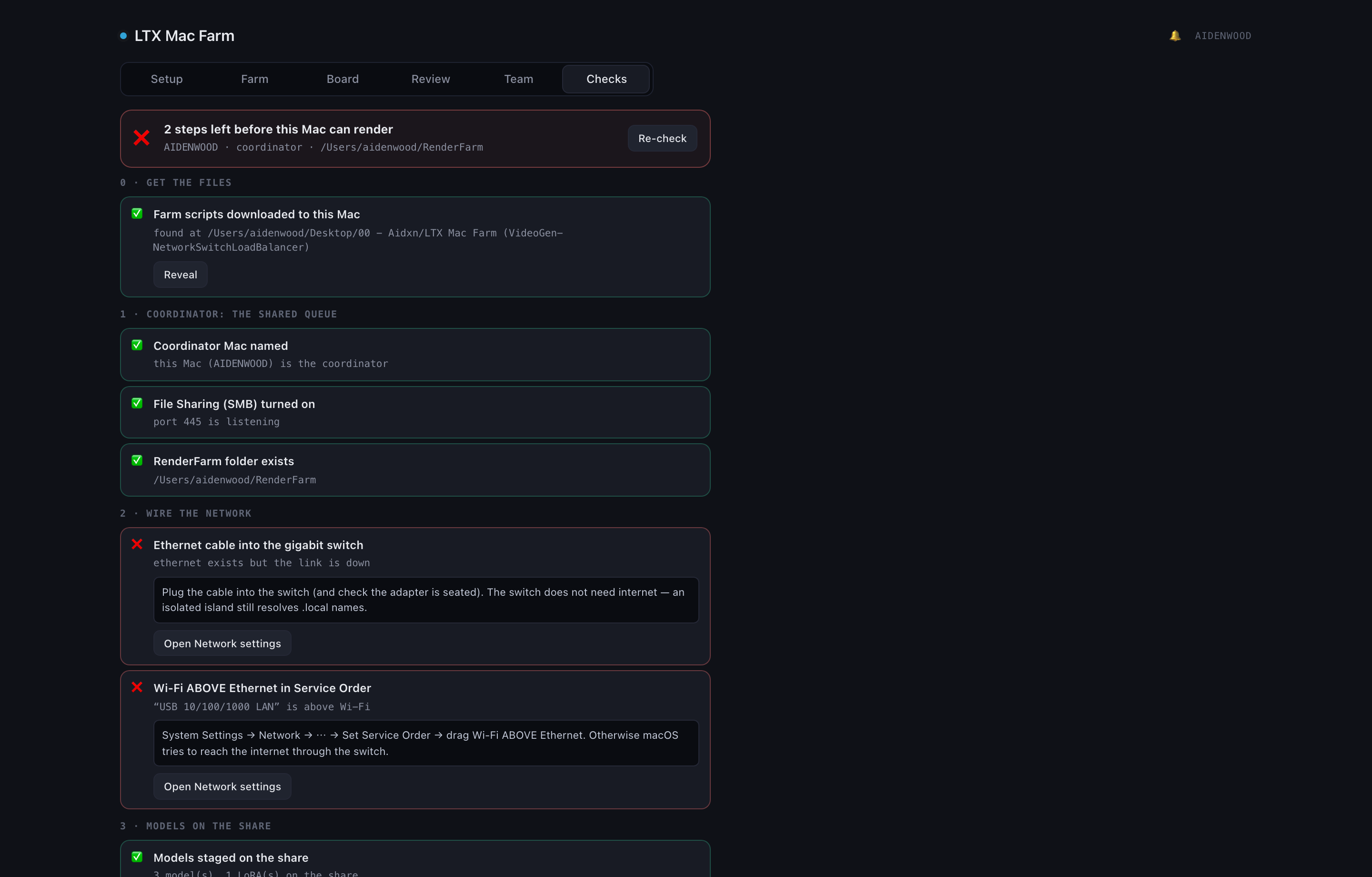
The app checks every step of this for you, per Mac, with the exact fix and a button that performs it. Nobody has to reverse-engineer the network from a README.

on the coordinator · publish the models to the share (hardlinks, seconds)

FARM_ROOT=~/RenderFarm ./seed_farm_assets.sh

on every render Mac · Homebrew, uv, LTX2-MLX, mflux — mostly unattended

./setup.command

then · joins the farm and starts claiming jobs

./start_worker.command

queue work from any Mac · or just use the app

./enqueue.sh --id hail_hero --prompt "storm clouds over a QLD roof" --seed 8804

Stuck on any step — Gatekeeper warnings, a Mac that won’t claim work, memory kills, stalled jobs? There’s a fix-first guide for each: browse the docs — or jump straight to memory & OOM, stalled jobs, queueing jobs or the headless gateway.

The app's farm operations and farm-wide limits

A headless Mac in a cupboard runs the gateway on its own:

ltx-mac-farm --serve

It still shows up in everyone’s Team view, still publishes its presence, and can still be set up from a browser.

Changelog

What’s landed.

v1.2

The farm gets a front door

  • A web gateway: the whole app served over HTTP — the board on a phone, a headless Mac in a cupboard.
  • A job board with drag-to-reorder — claim order is filename order, so a drag genuinely re-prioritises the farm.
  • Overnight autopilot: requeues quiet Macs, retries one flake, pauses on a failure streak, logs everything.
v1.1

The popover grows up

  • Menubar popover redesigned, with a ping as each job moves.
  • Covered with 56 behaviour tests.
v1.0

Staging at hardlink speed

  • Models stage to the share by hardlink, not copy — 87GB in 0.68s using 67MB.
  • One farm-root resolver shared across every script; fixed an openrsync incompatibility.
v0.9

Model staging without a terminal

  • One-click model staging from the app; Gatekeeper no longer blocks the script buttons.
  • Added --selftest, and collapsed share-mounting onto one dispatch path.
v0.8

Setup that fixes itself

  • The app opens on a guided setup wizard instead of an empty dashboard.
  • Fixed EACCES creating queue folders and "Farm folder not found" on step 4; real config now flows into the scripts.
v0.7

Memory that tells the truth

  • RAM-aware admission control — jobs are priced before they’re claimed, against a budget from each Mac’s installed RAM.
  • Corrected memory limits that were 3–5× wrong: a 27.5GB MLX render reports 4.9GB to ps, so free-memory checks were blind.
v0.6

Setup & Verify, in-app

  • A Setup & Verify page: config, link verification, and the worker list in one place.
v0.5

Past the macOS gate

  • Fixed the "app is damaged" gate: the app re-signs ad-hoc, and quarantine removal is documented.
v0.4

A real name

  • FarmMon became LTX Mac Farm — app, crate and binary.
v0.3

Reliability primitives

  • Priority lanes, heartbeats and a heartbeat-aware reaper, a disk guard, and promote.sh for cherry-picked winners.
  • The README setup rewritten around the four stages.
v0.2

The menubar app

  • A menubar app watching the farm, plus the next-features list.
v0.1

The farm itself

  • An LTX render farm as a switch-based load balancer: a shared folder is the queue, an atomic mv is the lock.
  • farm_worker.sh claims and renders; enqueue.sh queues from any Mac.

Recent wins

Every clip, with the exact job file that made it.

Approved renders come off the farm with their prompt, seed, size, model, render time and peak memory attached — so a win is reproducible, not a lucky screenshot.

See the generations

Build the farm.

Four Macs, a $20 switch and one shared folder. The app handles the rest — and it’s free.

built by Aidxn Design · Design engineering studio, Gold Coast